




Guide · BigQuery
Should this email go out at all? Build a send guardrail with AI.GENERATE in BigQuery
AI makes hyper-personalized offers cheap to produce. Use Gemini in BigQuery to check whether each message is worth sending before it reaches a customer.

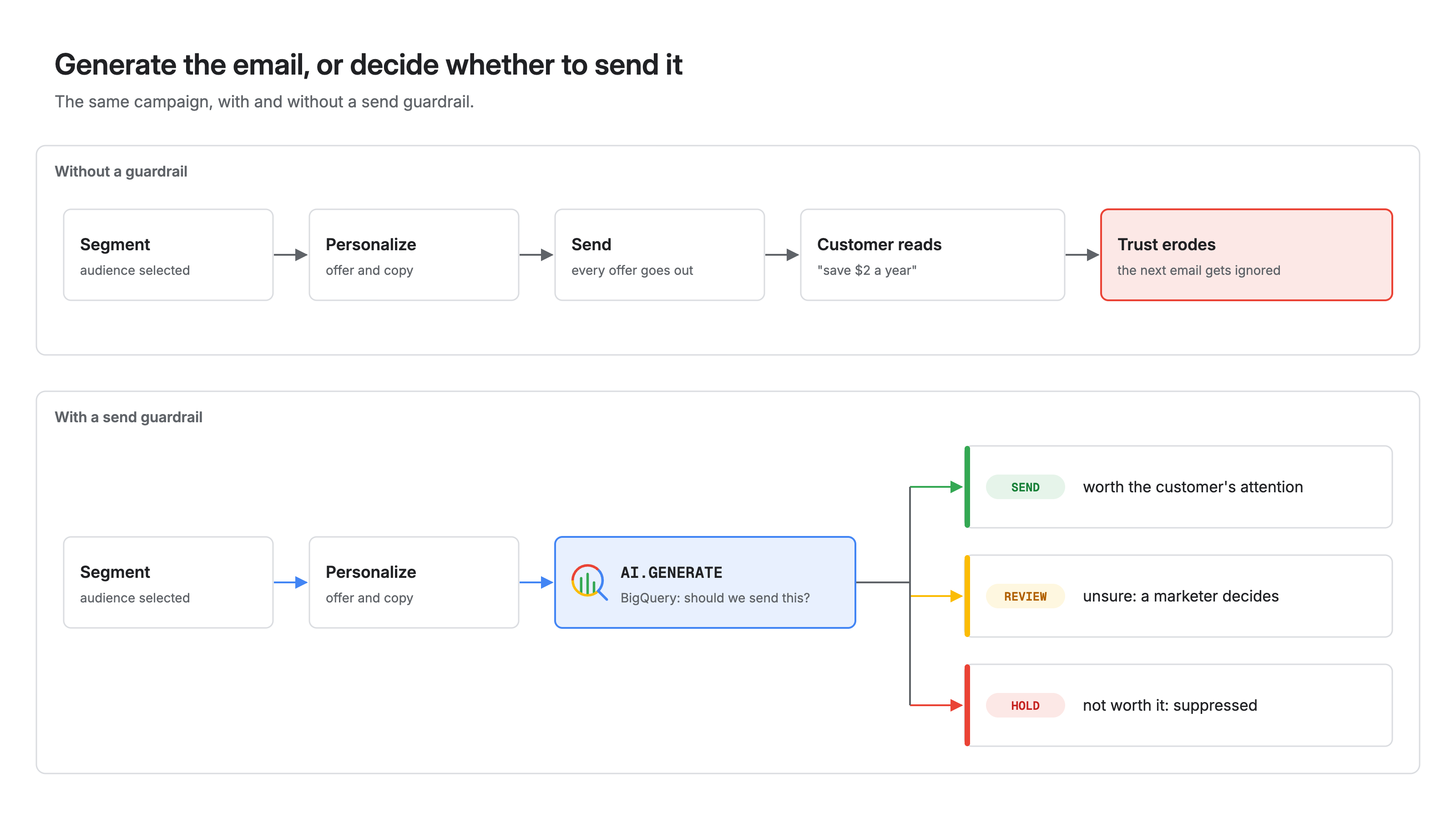
I recently got a "highly personalized" email from an auto insurer. The offer was to switch my policy and save $2 a year.
Nobody switches auto insurers for $2 a year. The email didn't just fail to convert. It taught me that this sender's next email probably isn't worth opening either.
Nothing in that pipeline was broken. Segmentation, personalization and scheduling all worked. What was missing was a check on whether the message should be sent at all. AI can personalize offers at scale, but without guardrails it trains customers to ignore you.
This post shows how to build that check in BigQuery with AI.GENERATE. You'll learn:
- Where a send guardrail sits in a campaign pipeline
- How to write the guardrail as one SQL query with a structured output schema
- How to fail closed, keep costs bounded, and give marketers an audit trail
Ask the model a different question
Most marketing teams use generative AI to write the copy. The more useful question comes one step earlier: should this customer get this message at all?
Answering it takes context a static rule doesn't have. Switching auto insurers means buying a new policy, cancelling the old one and doing the paperwork, so a small saving isn't worth the effort. A model can weigh the offer against that friction and explain its call in one sentence.
How it works
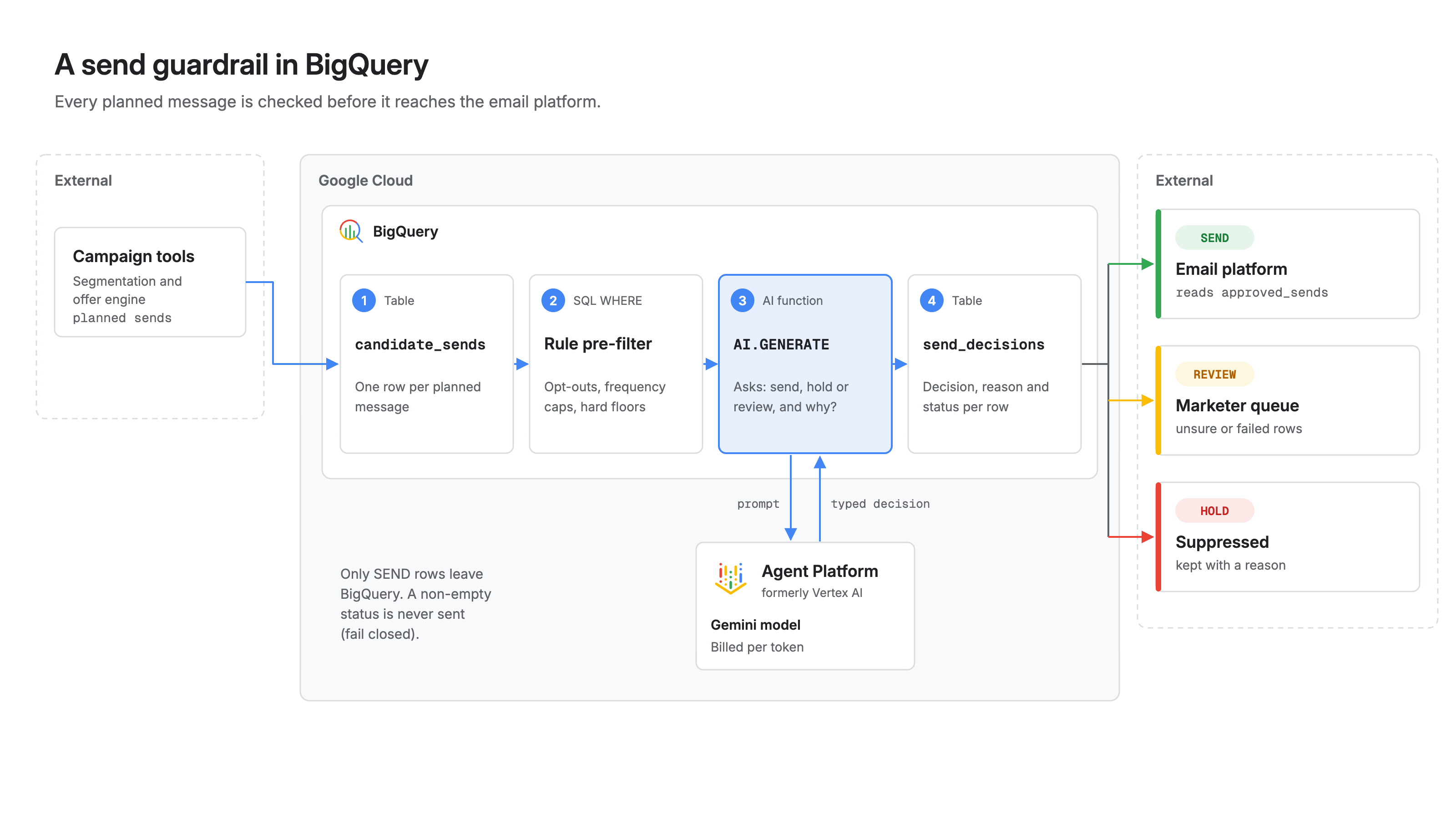
The guardrail is a decision step between your offer engine and your email platform, running where the customer data already lives.
- Candidate sends. Your segmentation or offer engine writes one row per planned message to a BigQuery table: customer context, offer details, and the computed value to the customer.
- Rule pre-filter. Plain SQL removes the obvious cases: opted-out customers, frequency caps, offers below a hard floor. No model needed.
- AI.GENERATE review. For the rows that remain,
AI.GENERATEsends the context and offer to a Gemini model and returns a structured decision:SEND,HOLD, orREVIEW, plus a one-sentence reason. - Decisions table. Only
SENDrows reach your email platform.HOLDrows are suppressed and logged.REVIEWrows go to a marketer.
AI.GENERATE is a general-purpose function: you choose the prompt and model parameters, and it returns a STRUCT with the generated result (or your own typed fields, if you set output_schema), the full_response and a per-row status. It became generally available in January 2026.
Step 1: Materialize the candidate sends
Write the candidates to a table before calling the model. Google's documentation recommends this: in complex queries with joins or ORDER BY ... LIMIT, the model can process more rows than you expect. A materialized table keeps the count exact.
CREATE OR REPLACE TABLE marketing.candidate_sends AS
SELECT
  c.customer_id,
  o.offer_id,
  c.customer_summary,         -- e.g. tenure, current product, recent interactions
  o.offer_summary,            -- e.g. "Switch to our auto policy"
  o.product_category,         -- e.g. 'auto_insurance'
  o.est_annual_saving_usd
FROM marketing.campaign_audience AS c
JOIN marketing.offers AS o USING (segment_id)
WHERE c.email_opt_in
  AND c.emails_last_7_days < 3                   -- frequency cap
  AND o.est_annual_saving_usd >= 1;              -- hard floor: never ask a model about $0
Keep deterministic rules in SQL. The model is for the gray zone, not for logic that fits in a WHERE clause.
Step 2: Write the guardrail query
The prompt asks what I'd ask a human reviewer: given the friction of switching, is this saving a compelling enough reason to email this customer?
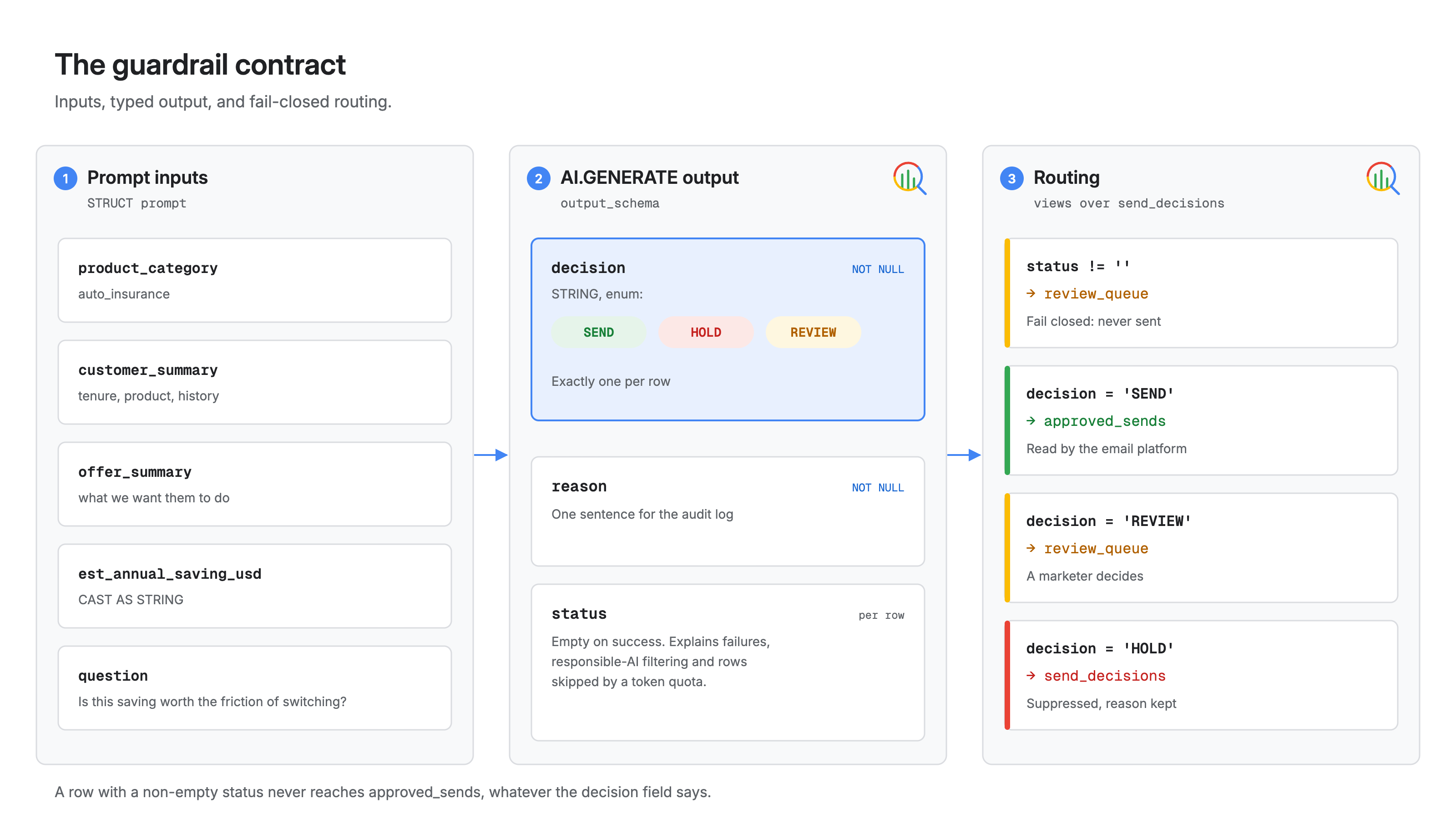
output_schema turns the response into typed columns. The enum option limits the decision to three values, and NOT NULL requires a decision and a reason on every row.
CREATE OR REPLACE TABLE marketing.send_decisions AS
SELECT
  customer_id,
  offer_id,
  est_annual_saving_usd,
  g.decision,
  g.reason,
  g.status
FROM (
  SELECT
    *,
    AI.GENERATE(
      (
        'You review planned marketing emails before they are sent. ',
        "Decide whether this email is worth the customer's attention. ",
        'Consider how much effort the offer asks of the customer. ',
        'Product category: ', product_category,
        '. Customer context: ', customer_summary,
        '. Offer: ', offer_summary,
        '. Estimated annual saving for this customer in USD: ',
        CAST(est_annual_saving_usd AS STRING),
        '. Given the friction of switching, is this a compelling enough reason ',
        'to email this customer? Return SEND, HOLD, or REVIEW if unsure.'
      ),
      output_schema => '''
        decision NOT NULL STRING OPTIONS(
          description = 'SEND if the offer clearly justifies the email, HOLD if it does not, REVIEW if unsure',
          `enum` = ['SEND', 'HOLD', 'REVIEW']),
        reason NOT NULL STRING OPTIONS(
          description = 'One sentence a marketer can read in an audit log')
      ''',
      model_params => JSON '{"generation_config": {"thinking_config": {"thinking_level": "LOW"}}}'
    ) AS g
  FROM marketing.candidate_sends
);
A few details matter here:
- Struct prompts. A struct prompt concatenates its fields in order, mixing instructions and columns without one long
CONCAT. Fields must beSTRINGvalues (or object references), so the numeric saving is cast. - Thinking level. A send decision doesn't need deep reasoning. For Gemini 3 and later models, setting
thinking_leveltoLOWcuts latency and cost. - Endpoint. Without
endpoint, BigQuery picks a recent stable Gemini model. Pin one once the prompt is tested, so a model change can't silently shift your decisions. - Credentials. Without
connection_id, the query uses end-user credentials. Scheduled production jobs should use a connection.
Step 3: Fail closed and route the decisions
status is empty when a row succeeds. If a request fails, is filtered, or is skipped because a token quota ran out, status says why. Treat those rows as HOLD. A guardrail that sends when it can't decide isn't a guardrail.
CREATE OR REPLACE VIEW marketing.approved_sends AS
SELECT customer_id, offer_id
FROM marketing.send_decisions
WHERE COALESCE(status, '') = ''
  AND decision = 'SEND';

CREATE OR REPLACE VIEW marketing.review_queue AS
SELECT customer_id, offer_id, est_annual_saving_usd, decision, reason, status
FROM marketing.send_decisions
WHERE COALESCE(status, '') != ''
   OR decision = 'REVIEW';
Point your email platform at approved_sends only. Everything else stays in BigQuery with a reason attached.
Step 4: Keep costs and behavior predictable
Each AI.GENERATE call is a model request, billed separately from BigQuery compute. Three controls keep it in check:
- Estimate first. Run
AI.COUNT_TOKENSon the assembled prompt text for each row incandidate_sendsto size input tokens before each campaign. - Set token quotas. BigQuery has daily input and output token quotas for generative AI functions, per project and per user, under IAM & Admin > Quotas & System Limits. If a quota runs out mid-query,
AI.GENERATEstill completes and skipped rows carry the error instatus, which the fail-closed view already handles. - Shrink the candidate set. Every row the SQL pre-filter removes is a model call you don't pay for.
Then test the prompt like code. Keep a small table of past offers your marketers agree on, including obvious "never send" cases like the $2 one, and check decisions against it before every prompt or model change.
When to use AI.IF instead
BigQuery's managed AI.IF function evaluates a natural-language condition, returns a BOOL that fits in a WHERE clause, and can choose the model for you. For a plain yes/no filter, it's simpler.
Use AI.GENERATE when you need a reason for every decision, a third review outcome, and a per-row status that explains failures so you can fail closed on them. For a guardrail that marketing and compliance teams will audit, that structure is worth it.
What this means for your team
- Change the question. Use AI to decide whether a message should be sent, not just to write it.
- Keep it in the warehouse. The customer context is already in BigQuery. The guardrail is one scheduled query, not a new service.
- Split the work. SQL handles hard rules, the model handles judgment calls, and people handle the uncertain ones.
- Make every decision explainable. A typed decision and a one-line reason show marketing, legal and data teams why each email did or didn't go out.
Personalization without common sense is just highly targeted spam. A send guardrail protects the attention every future campaign depends on.
Get started
Start with one campaign. Materialize its candidate sends, run the guardrail query, and compare the HOLD list with what your team would have stopped by hand.
If you want help designing guardrails for your campaign pipeline, talk to FAAN.
Further reading
- The AI.GENERATE function, BigQuery documentation
- Generative AI overview, BigQuery documentation
- The AI.IF function, BigQuery documentation
- The AI.COUNT_TOKENS function, BigQuery documentation
- BigQuery AI supports Gemini 3.0, simplified embedding generation and new similarity function, Google Cloud Blog
- Using BigQuery's generative AI cost management features, Google Cloud Blog