


Guide · AI agents
Stop building agent infrastructure around BigQuery: publish a data agent to Gemini Enterprise over A2A
BigQuery data agents now publish to Gemini Enterprise over A2A. The eight setup steps, what the platform handles, and what your team still owns.

Most teams I see that want "chat with our warehouse" end up building the same stack. They write guardrails so the model can't run anything destructive. They pick between a shared service account and per-user access, and then build the audit trail. They hand-map business questions to SQL with schema prompts and few-shot examples. They format results, build a chat UI, and wire it into the other tools people already use. Then they host all of it and get paged for it.
Most of that is now a managed path. In BigQuery, you build a data agent with Conversational Analytics, publish it, and Gemini Enterprise calls it over the Agent2Agent (A2A) protocol. Business users ask questions in plain English, in the same app where they use their other agents. Your team maintains no agent runtime.
Here's how the pieces connect, how to set it up, and what is still yours.
How it works
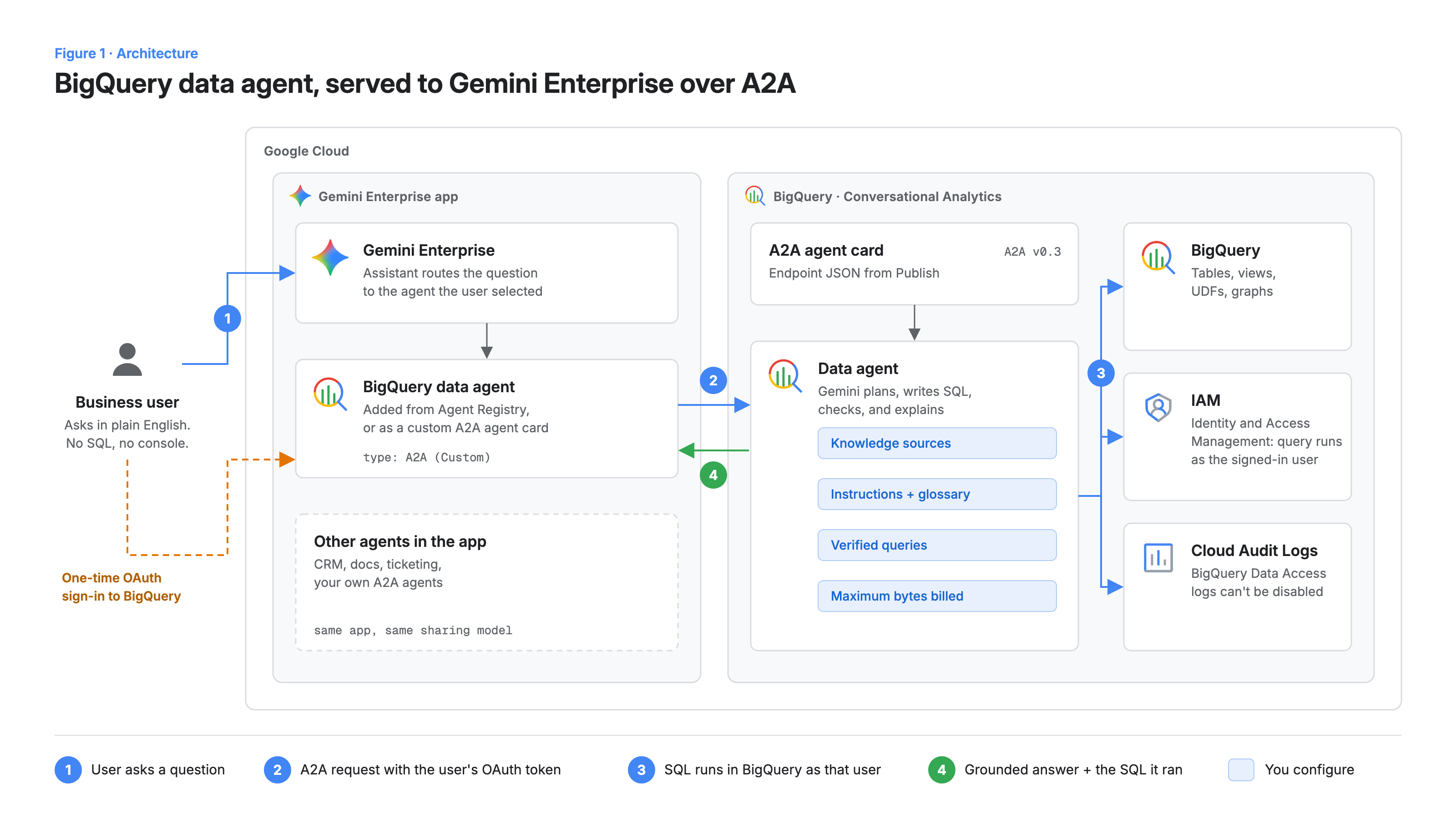
There are three layers, shown in Figure 1.
The data agent, in BigQuery. A data agent pairs knowledge sources (tables, views, graphs and UDFs) with instructions for one use case. Gemini plans the analysis, writes and runs the SQL, and explains the result, showing the SQL it ran. You ground it with three kinds of context: verified queries (previously called "golden queries"), glossary terms, and agent instructions. Google's docs recommend prioritizing them in that order.
The A2A endpoint. When you publish, BigQuery exposes the agent as an A2A endpoint, described by an agent card: a JSON document listing the agent's name, description, skills, and URL. A2A is an open protocol for agents to discover each other and exchange tasks over HTTP. Gemini Enterprise supports the A2A v0.3 streaming mechanism.
Gemini Enterprise. An admin adds the agent to a Gemini Enterprise app. Each user completes a one-time OAuth sign-in to BigQuery. After that, Gemini Enterprise sends the user's token with every A2A request. Queries run as that user, so BigQuery IAM decides what each person can see, and Cloud Audit Logs records every query.
Homegrown agents often cut this corner with a shared service account, which is quick to set up and painful to audit. Here, per-user identity is the default.
What moves off your plate
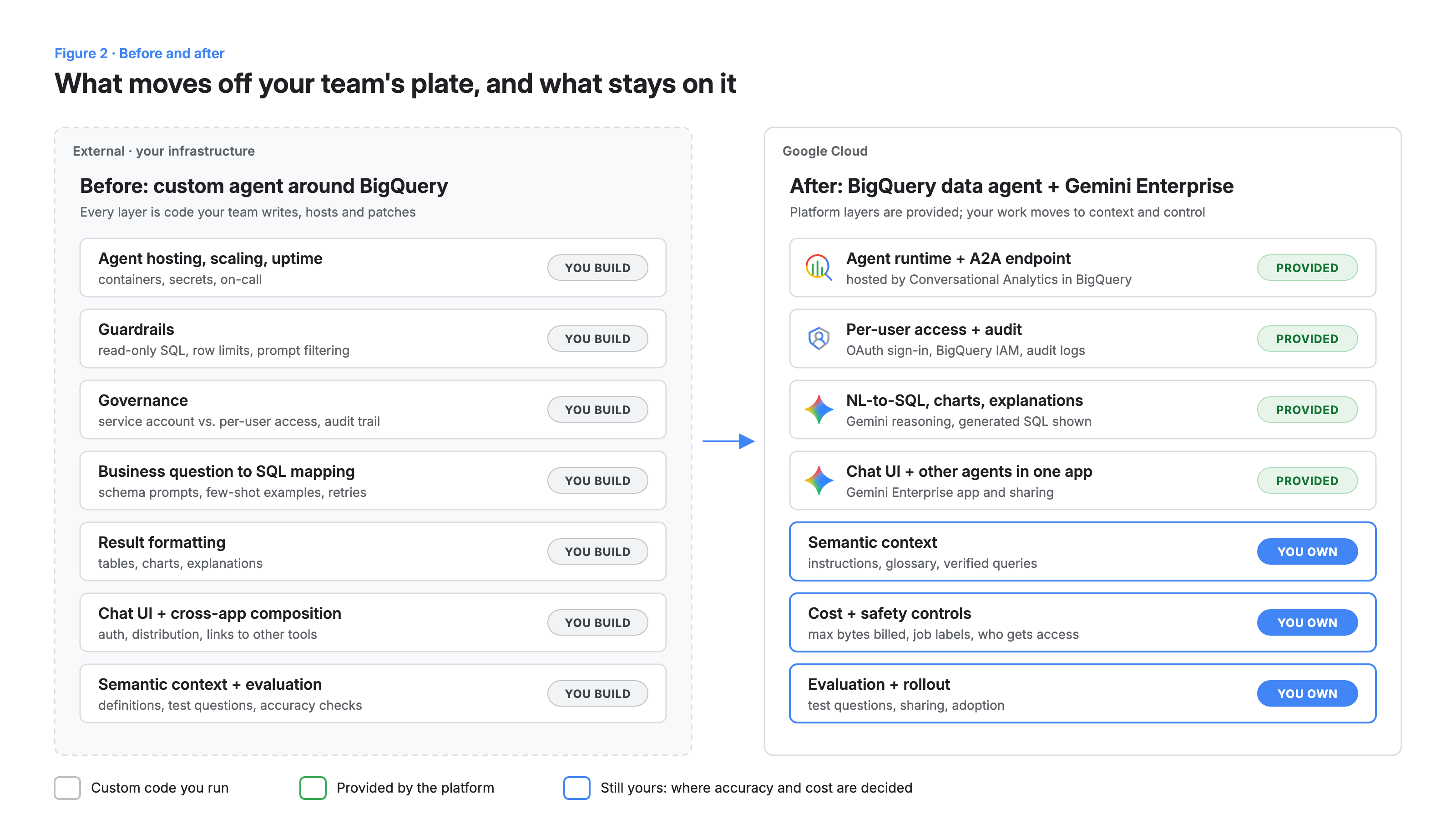
Compare the two columns in Figure 2. The runtime, the A2A endpoint, per-user access, SQL generation, charts and the chat surface all move to the platform. The agent also lives in the same Gemini Enterprise app as your other agents and connectors. People can go from "what were Q3 renewals by region?" to the next step without switching tools. Most custom builds never get that far.
What stays with you is the part that decides whether answers are right: the business context.
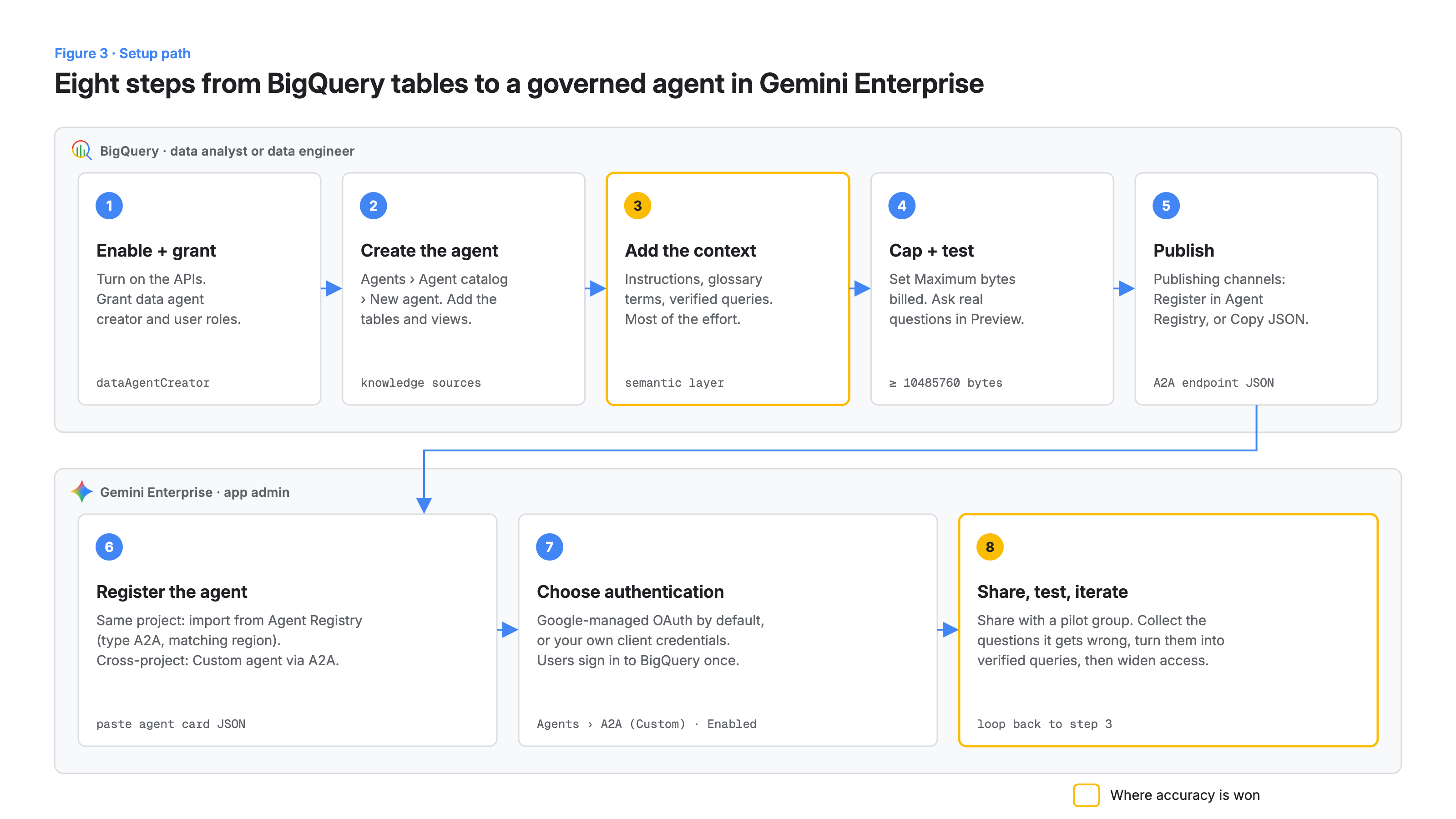
Set it up in eight steps
1. Enable the APIs and grant roles
The docs list four APIs: BigQuery, Gemini Data Analytics, Gemini for Google Cloud, and Knowledge Catalog.
gcloud services enable \
  bigquery.googleapis.com \
  geminidataanalytics.googleapis.com \
  cloudaicompanion.googleapis.com \
  dataplex.googleapis.com \
  --project=PROJECT_ID

# Builders create agents; consumers chat with them.
gcloud projects add-iam-policy-binding PROJECT_ID \
  --member="group:data-builders@YOUR_DOMAIN" \
  --role="roles/geminidataanalytics.dataAgentCreator"

gcloud projects add-iam-policy-binding PROJECT_ID \
  --member="group:finance-analysts@YOUR_DOMAIN" \
  --role="roles/geminidataanalytics.dataAgentUser"
Whoever creates the agent needs query access to every knowledge source they add. Registering it in Gemini Enterprise requires the Gemini Enterprise Admin role (roles/discoveryengine.agentspaceAdmin) and the Discovery Engine API.
2. Create the agent and add knowledge sources
In the BigQuery console, go to Agents, open the Agent catalog tab, and click New agent. Scope it to one domain, such as "Revenue and renewals," with only the tables and views that domain needs. Narrow agents are easier to test and to trust.
3. Add the context
Most of your effort goes here. Rewrite unclear table and field descriptions, add glossary terms ("ARR," "net retention," "active customer"), and write short instructions for defaults, such as which date field means "this quarter."
Then add verified queries for the questions that matter most. They support parameters, so one query can answer many variations of a question:
-- Verified query: "What was net revenue for <region> in <quarter>?"
SELECT
  region,
  DATE_TRUNC(invoice_date, QUARTER) AS quarter,
  SUM(amount_usd) - SUM(refund_usd) AS net_revenue_usd
FROM `PROJECT_ID.finance.invoices`
WHERE region = @region
  AND DATE_TRUNC(invoice_date, QUARTER) = @quarter_start
GROUP BY region, quarter;
Each verified query states a business definition once, where the agent can reuse it.
4. Cap cost, then test in Preview
Under Settings, set Maximum bytes billed. The minimum is 10485760 (10 MiB). Queries from agent conversations are billed at BigQuery compute rates, so this cap is your first cost control. Then use the Preview pane to ask the questions your users will actually ask, and read the SQL behind every answer.
5. Publish
Click Publish to open Publishing channels. If BigQuery and Gemini Enterprise are in the same project, the recommended route is to check Register this agent under Agent Registry. If they're in different projects, click Copy JSON under Integrate via A2A and send the agent card to your Gemini Enterprise admin. The agent's region has to match the Agent Gateway's Agent Registry binding (US, EU, or Global), and you can't change it after saving.
6. Register the agent in Gemini Enterprise
For the same-project route: in Agent Registry, add an agent with type A2A, select the matching region, paste the JSON, and save. Then, in your Gemini Enterprise app, go to Agents, add an agent from Agent Registry, and click Add agent on its card.
For the cross-project route, go to Agents in your Gemini Enterprise app, click Add agents, choose Custom agent via A2A, and paste the card into Agent card JSON. The card follows the A2A shape:
{
  "protocolVersion": "0.3",
  "name": "Revenue and renewals",
  "description": "Answers questions about invoices, ARR and renewals in BigQuery.",
  "url": "https://<endpoint from BigQuery Copy JSON>",
  "version": "1.0.0",
  "capabilities": {},
  "skills": [{ "id": "data-analysis", "name": "Data analysis", "description": "Governed BigQuery analysis", "tags": [] }],
  "defaultInputModes": ["text/plain"],
  "defaultOutputModes": ["text/plain"]
}
Use the JSON BigQuery gives you as-is. The sample above only shows what the fields mean.
7. Choose authentication
Google-managed OAuth credentials are the default, and you don't need to enter client details. Use custom OAuth (client ID, client secret, authorization URI, token URI, and the https://www.googleapis.com/auth/bigquery scope) only if your organization requires it. The agent should then appear in the Agents table as Enabled, with type A2A (Custom).
8. Share, test, iterate
Share the agent with a pilot group first. Log the questions it answers wrongly or vaguely, turn the important ones into verified queries or glossary terms, and only then widen access. That loop is what makes the agent dependable.
What's still on you
A managed path doesn't mean nothing to manage. Plan for these:
- Launch stages. Conversational Analytics in BigQuery and the Conversational Analytics API are generally available. A2A support in that API is in Preview, and so are Conversational Analytics in Gemini Enterprise and the Custom agent via A2A registration path. Check the docs before you commit a production timeline.
- Semantic quality. The agent is only as accurate as your definitions. If your teams disagree on what "active customer" means, the agent will reflect that disagreement.
- Safety controls. Per the Gemini Enterprise docs, the console's Model Armor settings don't protect custom A2A agents, and agents added through the custom A2A path don't go through Agent Gateway policies. Decide what screening you need and where it runs.
- Cost visibility. Set bytes-billed caps for each agent and watch the job history. Large joins and frequent AI function calls add up.
- Cross-agent flows. Having BigQuery next to your other agents is useful. Test the end-to-end journeys you care about rather than assuming they compose cleanly.
What this means for your team
Stop spending engineering time on agent plumbing and put it into business context. The work that used to go into hosting, guardrails and SQL-generation code now goes into glossary terms, verified queries and an evaluation set of real questions. That work is cheaper, it compounds, and it sits with the people who know the data.
A practical first move: pick one domain with clear definitions and a group of people tired of waiting on analysts. Build one narrow agent, add ten verified queries, and pilot it in Gemini Enterprise for two weeks. You'll learn more from that than from another quarter of building infrastructure.
Get started
Start with a single data agent in BigQuery and publish it to a test Gemini Enterprise app this week. If you want help choosing the first domain, writing the semantic layer, or setting up governance for a wider rollout, talk to us.