




Guide · BigQuery
I embedded 54,392 emails in BigQuery for 70 cents. Here's the build.
A step-by-step build of semantic search over 54,392 Gmail messages: remote embedding model, IVF vector index and VECTOR_SEARCH, all in BigQuery SQL.

Most teams that want semantic search assume they need a new stack: an export pipeline, an embedding service, a separate vector database, and glue code to join results back to business data. I wanted to know how much of that BigQuery could absorb on its own, so I tested it on the messiest dataset I own: my Gmail archive.
The result: 54,392 emails embedded, indexed, and searchable by meaning, for about 70 cents in embedding cost. The search itself is one SQL statement. This post covers the architecture, the exact SQL, what the embeddings found, and when the pattern fits your team.
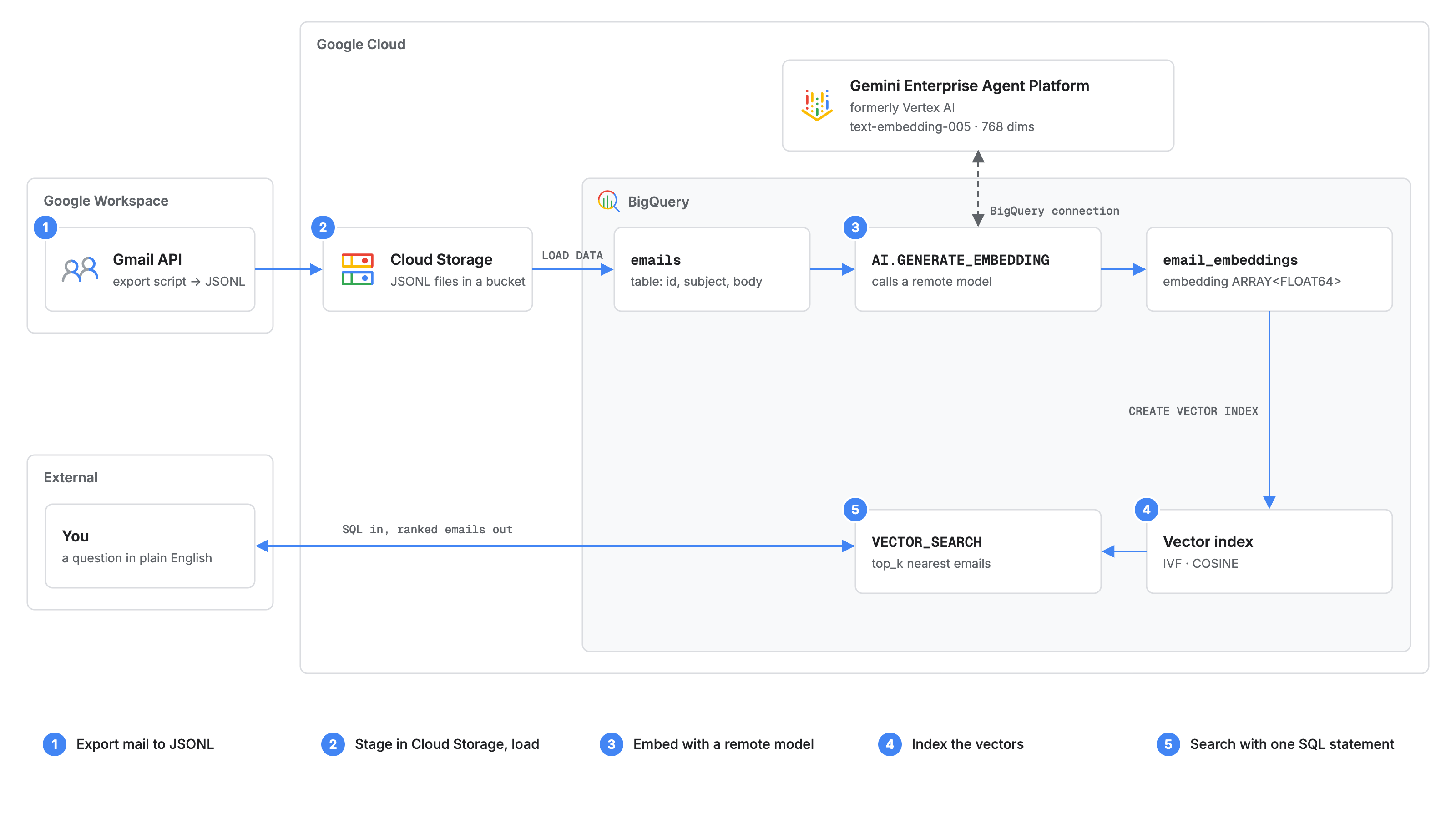
How it works
- Export. A small script reads messages through the Gmail API and writes newline-delimited JSON (JSONL).
- Stage and load. The files land in Cloud Storage and load into a BigQuery table.
- Embed.
AI.GENERATE_EMBEDDINGcalls a remote model,text-embedding-005on Gemini Enterprise Agent Platform (formerly Vertex AI), through a BigQuery connection. Each email becomes a 768-dimension vector. - Index.
CREATE VECTOR INDEXbuilds an IVF index with cosine distance. - Search.
VECTOR_SEARCHembeds a plain-English question with the same model and returns the nearest emails.
No vector database, nothing to provision. Storage, embedding, indexing, and search all run from the BigQuery editor.
A correction to my original post: I wrote that text-embedding-005 produced 3,072-dimension vectors. It produces 768; 3,072 is the default for gemini-embedding-001. The pipeline is the same with either model; only the endpoint and vector size change.
Step 1: Export Gmail to JSONL
All you need are the Gmail API's users.messages.list and users.messages.get methods and the read-only gmail.readonly scope. Keep only the fields you will search, and strip HTML so you don't pay to embed markup.
# Sketch: one JSON object per line, one line per message
for msg in list_all_message_ids(service):
    m = service.users().messages().get(userId="me", id=msg["id"], format="full").execute()
    row = {
        "id": m["id"],
        "sent_at": header(m, "Date"),
        "sender": header(m, "From"),
        "subject": header(m, "Subject"),
        "body": plain_text(m)[:4000],  # long bodies cost more and get truncated anyway
    }
    out.write(json.dumps(row) + "\n")
Copy the files to a bucket:
gcloud storage cp emails-*.jsonl gs://YOUR_BUCKET/emails/Step 2: Load into BigQuery
If the table doesn't exist, LOAD DATA creates it and auto-detects the schema. In this statement, JSON means newline-delimited JSON.
LOAD DATA INTO mail.emails
FROM FILES (
  format = 'JSON',
  uris = ['gs://YOUR_BUCKET/emails/*.jsonl']
);
Step 3: Generate embeddings with a remote model
Create the remote model once. It points BigQuery at the embedding endpoint through a connection whose service account has the Agent Platform User role (roles/aiplatform.user).
CREATE OR REPLACE MODEL mail.embedder
  REMOTE WITH CONNECTION `us.vertex_conn`
  OPTIONS (ENDPOINT = 'text-embedding-005');
Then embed every email in one statement. The function reads a column named content, so alias whatever you want embedded as content. With the RETRIEVAL_DOCUMENT task type, a column named title is also sent to the model and helps embedding quality.
CREATE OR REPLACE TABLE mail.email_embeddings AS
SELECT *
FROM AI.GENERATE_EMBEDDING(
  MODEL mail.embedder,
  (
    SELECT id, sent_at, sender,
           subject AS title,
           CONCAT(subject, '\n\n', body) AS content
    FROM mail.emails
  ),
  STRUCT('RETRIEVAL_DOCUMENT' AS task_type)
);
The output keeps your input columns and adds embedding (an ARRAY<FLOAT64>), statistics, and status. An empty status means success; re-run only the rows that failed.
If you have older code, ML.GENERATE_EMBEDDING still works and returns ml_generate_embedding_result. Google recommends AI.GENERATE_EMBEDDING for new queries.
Step 4: Create the vector index
CREATE OR REPLACE VECTOR INDEX email_idx
ON mail.email_embeddings(embedding)
STORING (title, sender, sent_at)
OPTIONS (index_type = 'IVF', distance_type = 'COSINE');
STORING copies those columns into the index, so a pre-filter on them in the base-table subquery prunes efficiently. Two details matter at this size. BigQuery doesn't populate a vector index on a table under 10 MB; 54,392 vectors of 768 FLOAT64 values come to roughly 330 MB, so the index builds. And IVF suits interactive search with a few queries at a time, while TreeAH is optimized for batches of hundreds or more query vectors.
Step 5: Search by meaning
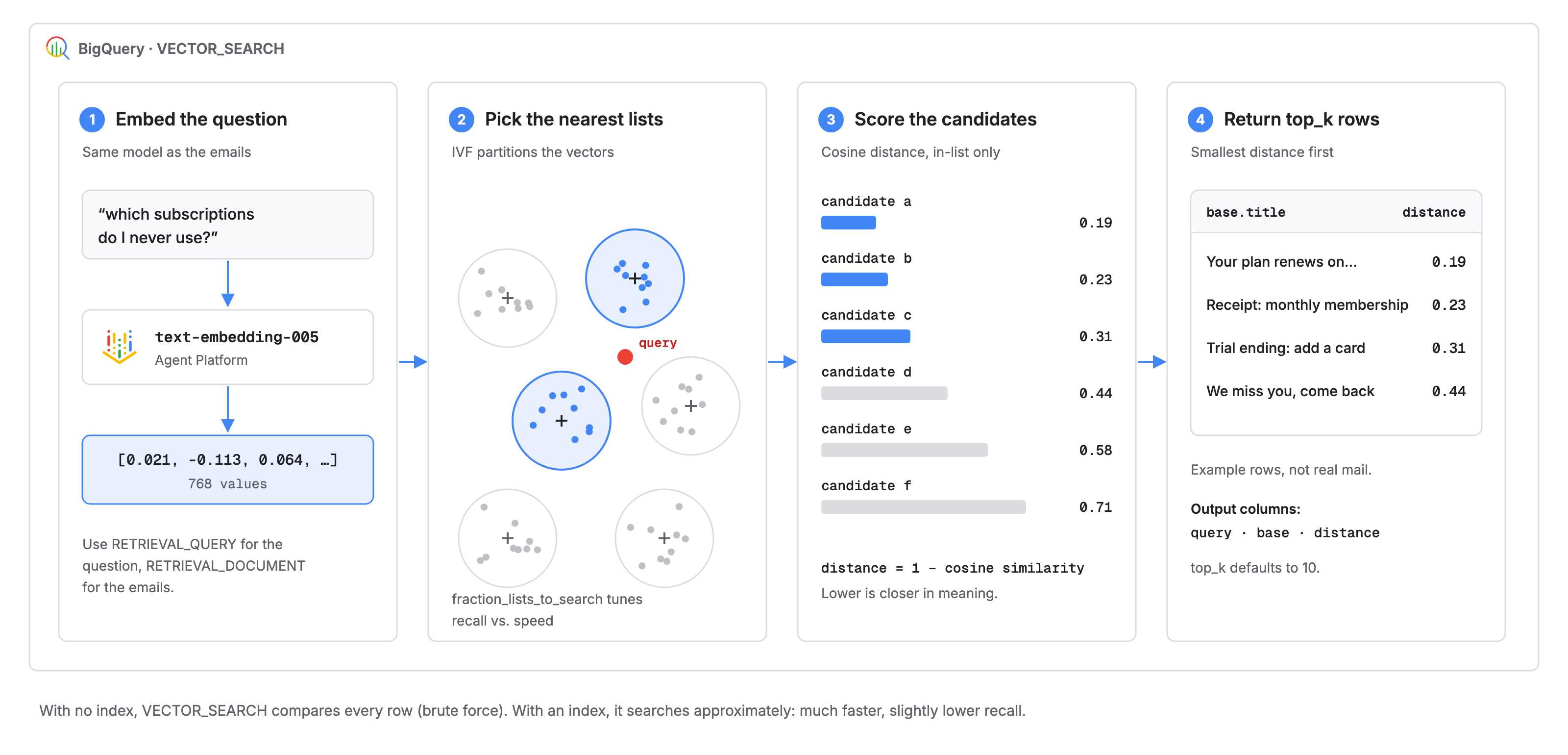
VECTOR_SEARCH does with an IVF index. Result rows are illustrative.SELECT base.title, base.sender, base.sent_at, distance
FROM VECTOR_SEARCH(
TABLE mail.email_embeddings, 'embedding',
(
SELECT embedding
FROM AI.GENERATE_EMBEDDING(
MODEL mail.embedder,
(SELECT 'subscriptions I pay for but never use' AS content),
STRUCT('RETRIEVAL_QUERY' AS task_type)
)
),
top_k => 20,
distance_type => 'COSINE'
)
ORDER BY distance;The question goes through the same model, this time with the RETRIEVAL_QUERY task type. VECTOR_SEARCH returns a query struct, a base struct with the matched row, and a distance; smaller is closer, and top_k defaults to 10. With an index, search is approximate. Tune recall with options => '{"fraction_lists_to_search": 0.05}', or pass '{"use_brute_force": true}' to get exact results for comparison.
What the embeddings found
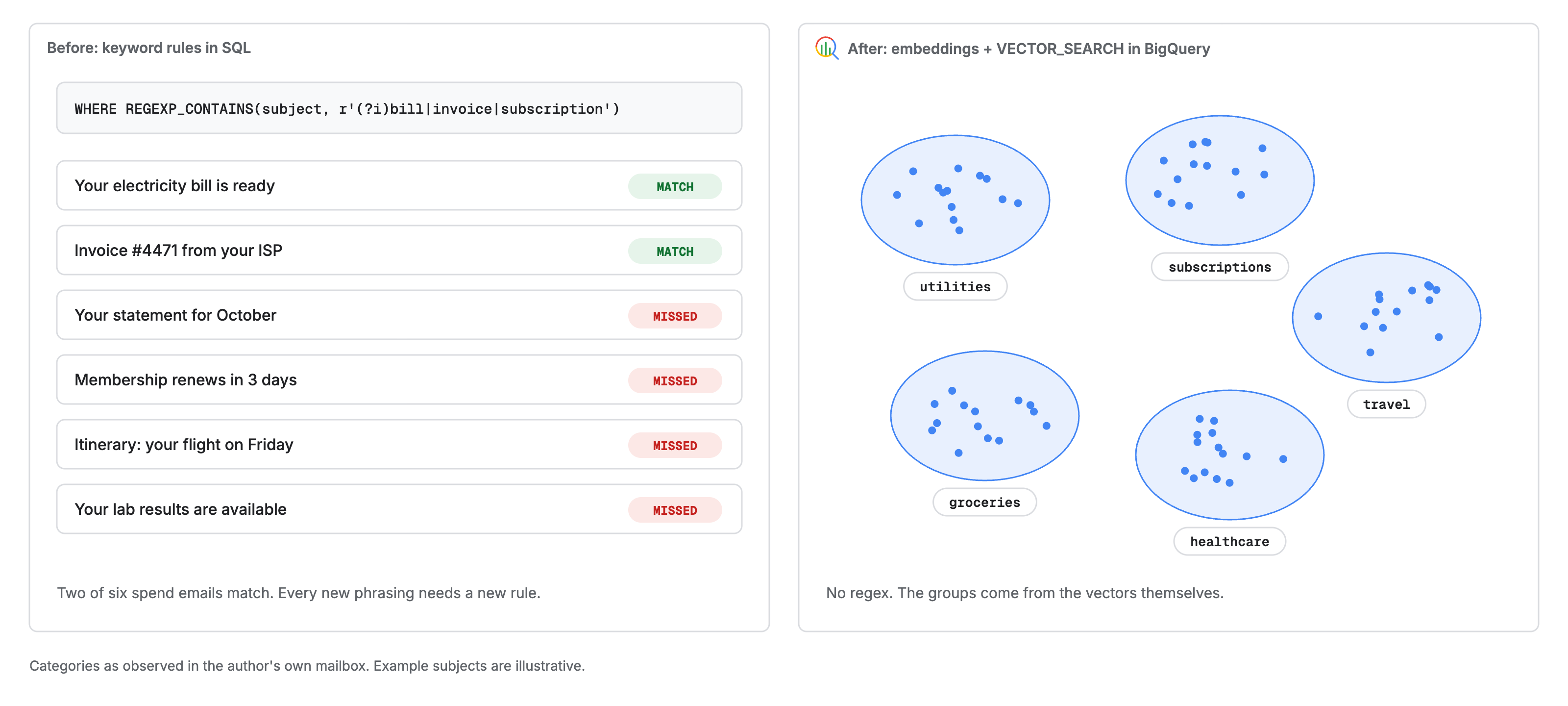
I didn't write a single keyword rule. The vectors still grouped my spending by meaning: utilities, groceries, subscriptions, travel, healthcare. The model told a bill, a subscription, and a trip apart as different kinds of spend, without a regex or a sender list.
That is the real gap in keyword search. A rule for bill|invoice|subscription catches emails that use those words and misses the ones that say "statement," "renews," or "itinerary." Embeddings put all of them next to the right neighbors.
To reproduce the grouping, write a one-line description of each category, embed those five rows, and run VECTOR_SEARCH with the categories as the base table, your emails as the query table, and top_k => 1. Each email takes the label of its nearest description.
The payoff was personal: by the end, I had cancelled a few subscriptions I was paying for and never using.
What it cost
The embedding run cost me about 70 cents. For reference, Agent Platform pricing lists text embedding models other than Gemini Embedding at $0.000025 per 1,000 input characters for online requests and $0.00002 for batch; at those rates, 70 cents covers roughly 28 to 35 million characters. Check current pricing before a larger run.
- Searches are billed as BigQuery compute. On-demand, you pay for bytes scanned in the base table, the index, and the query.
- Index builds and refreshes are free while indexed data stays under your organization's limit. Active indexes incur storage costs.
- Vector indexes aren't supported in BigQuery Standard edition.
text-embedding-005accepts up to 2,048 input tokens, so long bodies are truncated anyway. It is also English-only; for multilingual mail, usetext-multilingual-embedding-002orgemini-embedding-001. Cutting signatures, quoted replies, and HTML lowers cost and usually improves results.
What this means for your team
Every company has its own version of my inbox: support tickets, contracts, call notes, reviews, incident logs. That text is already in BigQuery or one load job away. This pattern lets you:
- Prototype semantic search in an afternoon, in SQL your analysts already write.
- Keep embeddings next to business data, so a result can join to customers, orders, or accounts in the same query.
- Reuse BigQuery's access controls, including row-level and column-level security, instead of securing a new store.
- Defer dedicated vector infrastructure until latency or scale demand it.
Be careful in two places. VECTOR_SEARCH is built for analytical and batch retrieval, not low-latency lookups behind a user-facing app; plan a serving layer if you need one. And because the index is approximate, measure recall against brute force on a sample before you rely on it.
Start with a dataset you know well. You'll see right away whether the results make sense.
Get started
Pick one table of free text you already own, follow the five steps, and ask it a question LIKE can't answer. If you want help choosing the use case, sizing the cost, or taking a prototype like this to production, talk to FAAN.
Further reading
- Introduction to embeddings and vector search (BigQuery documentation)
- Manage vector indexes (BigQuery documentation)
- Search functions: VECTOR_SEARCH (GoogleSQL reference)
- AI.GENERATE_EMBEDDING function (GoogleSQL reference)
- Get text embeddings: supported models (Gemini Enterprise Agent Platform documentation)
- BigQuery vector search now GA (Google Cloud Blog)
- Gemini and OSS text embeddings are now in BigQuery ML (Google Cloud Blog)