




Guide · BigQuery
Build golden records in BigQuery with Gemini: an MDM pipeline in SQL
Use embeddings and VECTOR_SEARCH to find duplicates, AI.GENERATE to confirm matches and draft golden records, and keep data stewards in the loop.

A few years ago I gave a language model a handful of messy customer records from different systems and asked for one master record. I expected a rough merge. Instead it spotted the data quality issues, fixed them, and picked the best value for each field from whichever source had it.
I predicted then that LLMs would end up inside MDM tools, helping data stewards. Today much of that work doesn't need a separate tool. BigQuery calls Gemini and embedding models from SQL, so matching, merging, and the review queue can live in the warehouse your analysts already query.
This post covers where the LLM belongs in master data management, where it doesn't, and the SQL for each step.
The problem: one customer, many versions
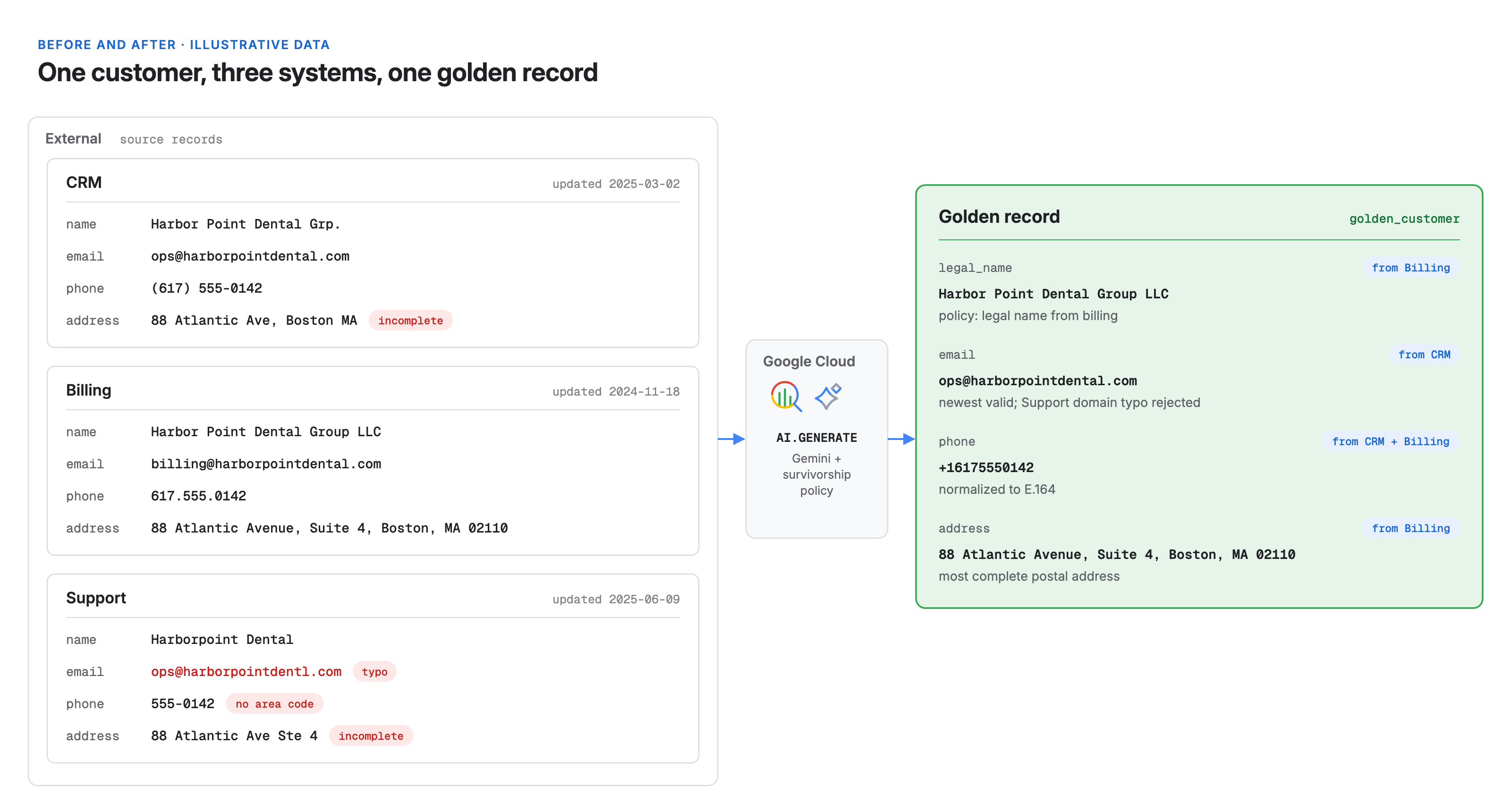
Every company with more than one system of record has this problem. Take a typical case. The CRM says "Harbor Point Dental Grp." The billing system says "Harbor Point Dental Group LLC." Support has a typo in the email and a phone number missing its area code. None of the records is wrong enough to fail a validation rule, and none of them is the truth.
Traditional MDM handles this with match rules and survivorship rules: exact keys, fuzzy string scores, "most recent wins," "billing system wins for legal name." Those rules work, but they are brittle. Every new abbreviation or address format becomes another rule, and stewards spend their days on records the rules couldn't decide.
An LLM is good at what rules are bad at: reading two records the way a person would and explaining its decision. It is bad at comparing millions of rows against each other. The design below uses each tool for its strength.
How it works
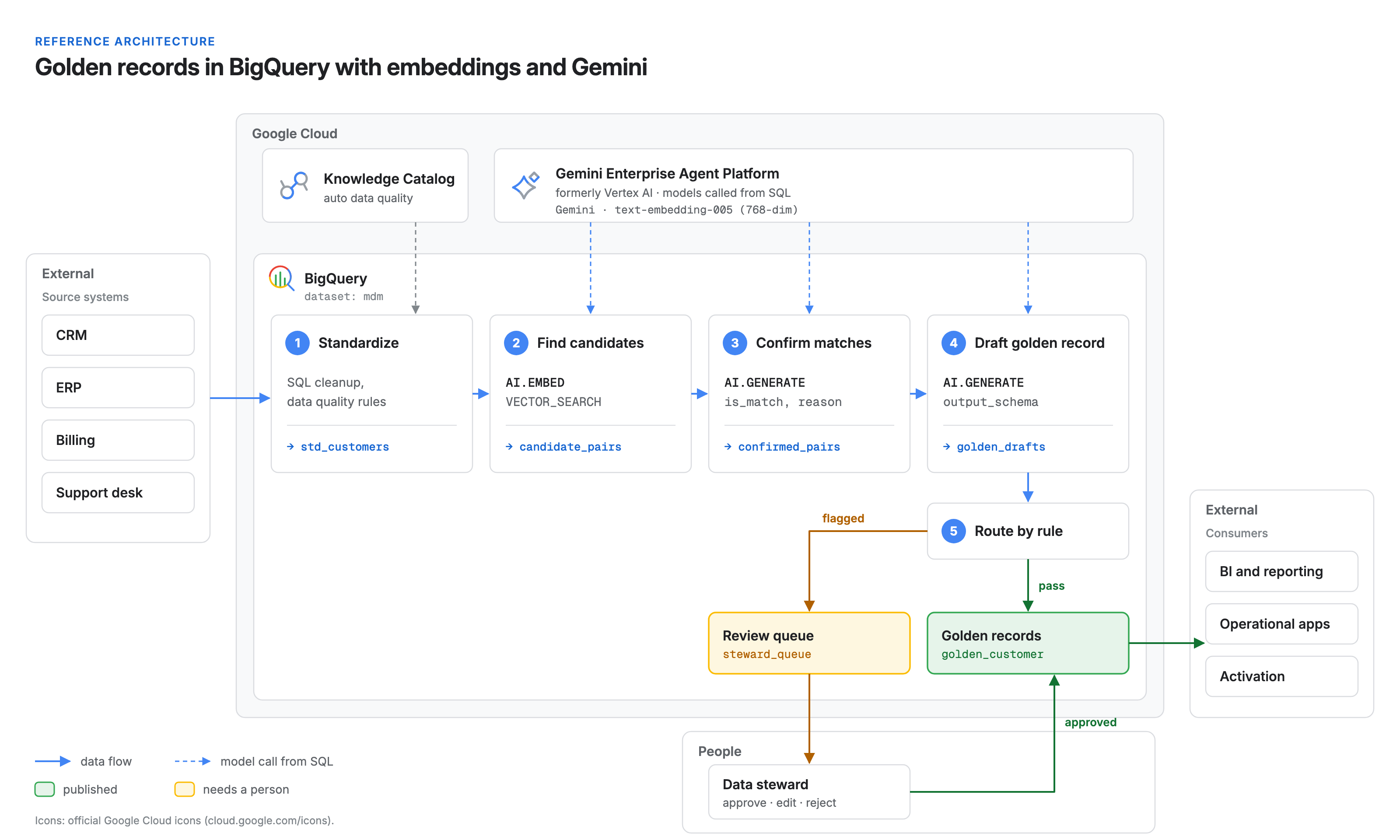
The pipeline runs in five steps, all in one BigQuery dataset:
- Standardize. Clean the obvious issues with plain SQL and rule-based data quality checks.
- Find candidates. Embed each record with
AI.EMBEDand useVECTOR_SEARCHto find likely duplicates. - Confirm matches. Ask Gemini, through
AI.GENERATE, to decide whether each candidate pair is the same entity, and why. - Draft the golden record. For each cluster, have Gemini apply your survivorship policy, fix issues, and return a structured record with field-level sources.
- Route to a steward. Auto-publish high-confidence drafts. Send the rest to a review queue.
The key constraint: the LLM never sees the whole table. Embeddings and vector search narrow millions of records to a small set of candidate pairs, and the model reasons only about those.
Step 1: Standardize before you match
Don't spend model tokens on problems a regular expression can fix. Trim whitespace, lowercase emails, strip punctuation from phone numbers, and map country names to codes in a staging view. For ongoing checks, auto data quality in Knowledge Catalog (formerly Dataplex Universal Catalog) can validate BigQuery tables against rules for missing values, regex patterns, allowed sets, and uniqueness.
The output is mdm.std_customers: one row per source record, with record_id, source_system, name, email, phone, address, and updated_at.
Step 2: Find candidate pairs with embeddings
Concatenate the fields that identify an entity into one string, embed it, and search the table against itself.
CREATE OR REPLACE TABLE mdm.customer_vectors AS
SELECT
  record_id,
  AI.EMBED(
    CONCAT(name, ' | ', IFNULL(email, ''), ' | ', IFNULL(phone, ''), ' | ', IFNULL(address, '')),
    endpoint => 'text-embedding-005'
  ).result AS embedding   -- ARRAY<FLOAT64>, 768 dimensions
FROM mdm.std_customers;

CREATE OR REPLACE TABLE mdm.candidate_pairs AS
SELECT query.record_id AS left_id, base.record_id AS right_id, distance
FROM VECTOR_SEARCH(
  TABLE mdm.customer_vectors, 'embedding',
  TABLE mdm.customer_vectors,
  top_k => 5,
  distance_type => 'COSINE')
WHERE query.record_id < base.record_id   -- drop self-matches and mirrored pairs
  AND distance < 0.15;                   -- tune on a labeled sample
Embeddings catch what string similarity misses: "Grp." and "Group," a reformatted address, a reordered name. Without a vector index, VECTOR_SEARCH uses brute force: exact results, fine for modest tables. As the table grows, add a vector index and accept approximate results in exchange for speed.
Step 3: Let Gemini confirm each match
Vector distance says two records look alike, not that they are the same customer. Two branches of a franchise can look almost identical. This is where the model earns its cost.
CREATE OR REPLACE TABLE mdm.confirmed_pairs AS
SELECT left_id, right_id, m.reason
FROM (
  SELECT
    p.left_id, p.right_id,
    AI.GENERATE(
      CONCAT(
        'Do these two records describe the same real-world customer? ',
        'Allow for abbreviations, typos, and moved addresses. ',
        'Different branches or locations are different customers. ',
        'Record A: ', TO_JSON_STRING(a), ' Record B: ', TO_JSON_STRING(b)),
      output_schema => 'is_match BOOL, reason STRING') AS m
  FROM mdm.candidate_pairs p
  JOIN mdm.std_customers a ON a.record_id = p.left_id
  JOIN mdm.std_customers b ON b.record_id = p.right_id
)
WHERE m.is_match;
With output_schema, AI.GENERATE returns your fields as typed values instead of free text, alongside full_response and a status field that is empty on success. Pairs whose call failed have no is_match and drop out here, so check status and rerun them. Keep the reason: it is what makes the decision reviewable.
Confirmed pairs then become clusters. A short BigQuery scripting loop of label propagation (each record repeatedly takes the smallest label among itself and its matched neighbors until nothing changes) gives every record a cluster_id in mdm.clusters. Unmatched records become clusters of one.
Step 4: Draft the golden record
This is the step that surprised me years ago. Given every record in a cluster and a written survivorship policy, the model picks the best value per field, fixes what is clearly broken, and says where each value came from.
CREATE OR REPLACE TABLE mdm.golden_drafts AS
WITH members AS (
  SELECT c.cluster_id, ARRAY_AGG(TO_JSON_STRING(s)) AS records
  FROM mdm.clusters c
  JOIN mdm.std_customers s USING (record_id)
  GROUP BY c.cluster_id
)
SELECT
  cluster_id,
  AI.GENERATE(
    CONCAT(
      'Build one golden customer record from these source records. ',
      'Policy: legal name from billing; most recently updated valid email; ',
      'phone in E.164; full postal address. Fix obvious typos and formatting. ',
      'Do not invent values that no source supports. ',
      'Records: ', ARRAY_TO_STRING(records, '\n')),
    output_schema => '''legal_name STRING, email STRING, phone STRING, address STRING,
                        field_sources STRING, fixes_applied STRING,
                        conflicts STRING, confidence FLOAT64''') AS g
FROM members;
Two lines in that prompt matter most. The policy line puts your survivorship rules in writing, where stewards can read and change them. The "do not invent" line, together with field_sources, keeps every value traceable to a source record.
Step 5: Keep the steward in the loop
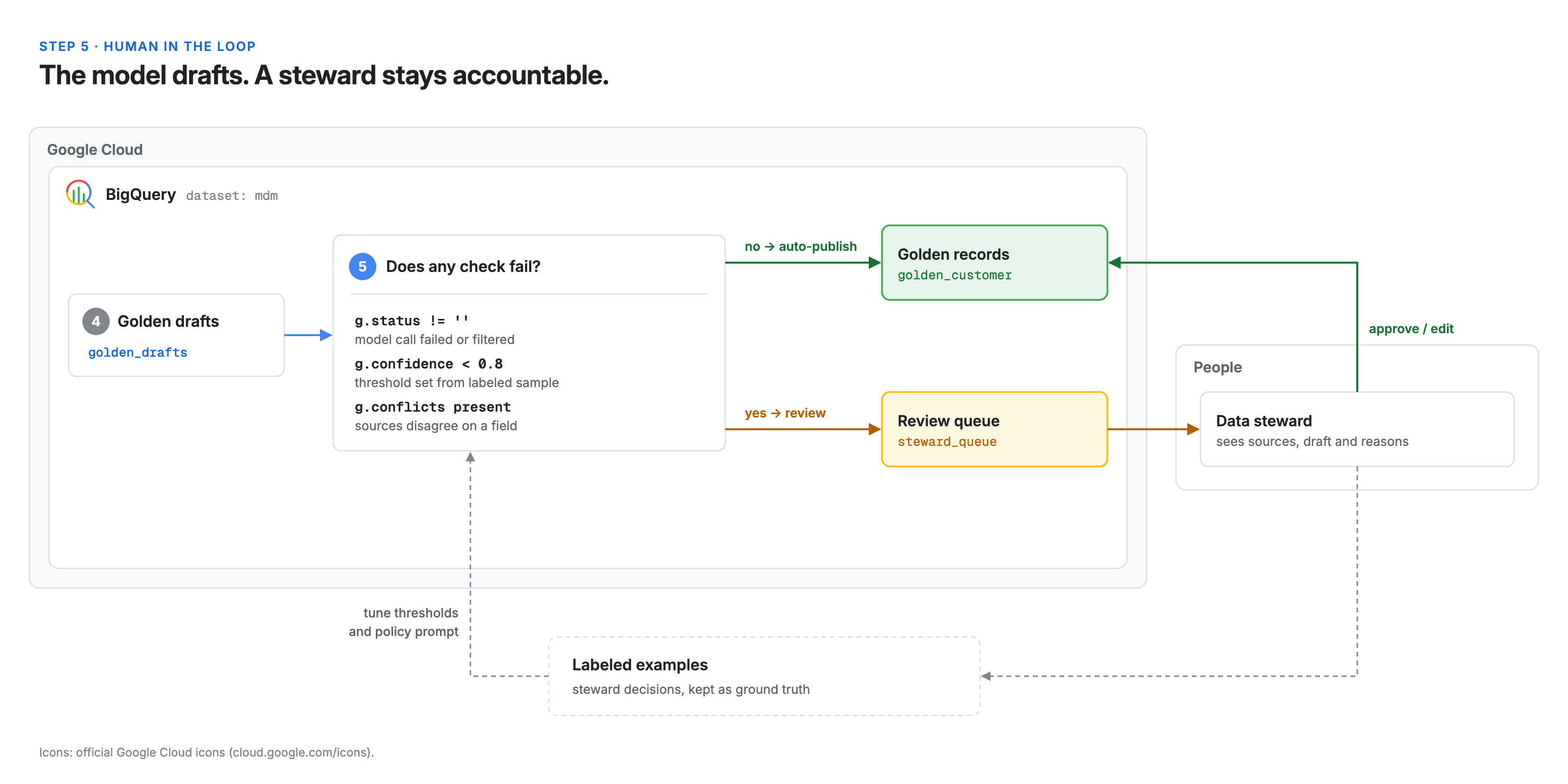
The LLM drafts; a person stays accountable. Route drafts by explicit rules:
CREATE OR REPLACE TABLE mdm.steward_queue AS
SELECT *
FROM mdm.golden_drafts
WHERE g.status != ''               -- model call failed or was filtered
   OR g.confidence < 0.8           -- threshold set from your labeled sample
   OR IFNULL(g.conflicts, '') != '';
Everything else publishes to mdm.golden_customer. Stewards see the source records, the draft, the field sources, and the model's reasoning side by side, so a review is a decision, not an investigation. Their corrections become labeled examples for tuning thresholds and refining the policy prompt.
What this means for your team
- Your MDM rules become a prompt your stewards can read. Survivorship stops living in a vendor config screen and becomes a few plain sentences under version control.
- Stewards review decisions, not raw data. Every match and every field arrives with a reason and a source.
- You still own the hard parts. Someone has to write the policy, build a labeled sample of known matches and non-matches, set thresholds from it, and decide what never auto-publishes. Customer records are personal data, so apply the same access controls to these tables and to the model connection as to the sources.
- Measure before you trust. Run the pipeline on records your stewards have already resolved and compare. Ship when the numbers hold.
Get started
Pick one domain, usually customers or suppliers, and the two source systems that disagree most. Run the five steps on a sample, review every draft by hand at first, then widen auto-publish as your labeled set grows.
If you want help designing the survivorship policy, the evaluation set, or the steward workflow, talk to us.
Further reading
- The AI.GENERATE function, BigQuery documentation
- The AI.EMBED function, BigQuery documentation
- VECTOR_SEARCH, BigQuery documentation
- Introduction to vector search, BigQuery documentation
- Auto data quality overview, Knowledge Catalog documentation
- How Tamr's Data Products leverage Google generative AI, Google Cloud Blog